Scheduler Policy
Summary
Currently, in a cluster with many GPU nodes, nodes are not binpack or spread when making scheduling decisions, nor are GPU cards binpack or spread when using vGPU.
Proposal
A node-scheduler-policy and gpu-scheduler-policy can be set in config. The scheduler uses this policy to implement node binpack or spread or GPU binpack or spread. Pod annotations hami.io/node-scheduler-policy and hami.io/gpu-scheduler-policy can override the default scheduler config.
User Stories
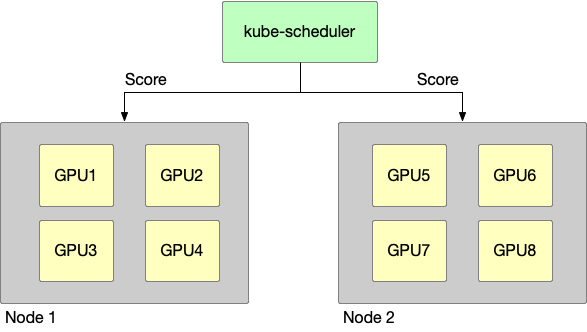
This is a GPU cluster, having two nodes, the following story takes this cluster as a prerequisite.
Story 1
node binpack, use one node’s GPU card whenever possible, e.g.:
-
cluster resources:
- node1: GPU having 4 GPU device
- node2: GPU having 4 GPU device
-
request:
- pod1: Use 1 GPU
- pod2: Use 1 GPU
-
scheduler result:
- pod1: scheduled to node1
- pod2: scheduled to node1
Story 2
node spread, use GPU cards from different nodes as much as possible, e.g.:
-
cluster resources:
- node1: GPU having 4 GPU device
- node2: GPU having 4 GPU device
-
request:
- pod1: Use 1 GPU
- pod2: Use 1 GPU
-
scheduler result:
- pod1: scheduled to node1
- pod2: scheduled to node2
Story 3
GPU binpack, use the same GPU card as much as possible, e.g.:
-
cluster resources:
- node1: GPU having 4 GPU device, they are GPU1,GPU2,GPU3,GPU4
-
request:
- pod1: Use 1 GPU, gpucore is 20%, gpumem-percentage is 20%
- pod2: Use 1 GPU, gpucore is 20%, gpumem-percentage is 20%
-
scheduler result:
- pod1: scheduled to node1, select GPU1
- pod2: scheduled to node1, select GPU1
Story 4
GPU spread, use different GPU cards when possible, e.g.:
-
cluster resources:
- node1: GPU having 4 GPU device, they are GPU1,GPU2,GPU3,GPU4
-
request:
- pod1: Use 1 GPU, gpucore is 20%, gpumem-percentage is 20%
- pod2: Use 1 GPU, gpucore is 20%, gpumem-percentage is 20%
-
scheduler result:
- pod1: scheduled to node1, select GPU1
- pod2: scheduled to node1, select GPU2
Design Details
Node-scheduler-policy
Binpack
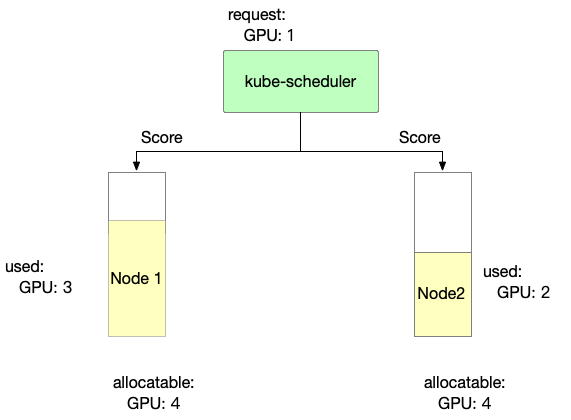
Binpack mainly considers node resource usage. The more full the usage, the higher the score.
score: ((request + used) / allocatable) * 10
- Binpack scoring information for Node 1 is as follows
Node1 score: ((1+3)/4) * 10= 10
- Binpack scoring information for Node 2 is as follows
Node2 score: ((1+2)/4) * 10= 7.5
In Binpack policy, Node1 is selected.
Spread
Spread mainly considers node resource usage. The less it is used, the higher the score.
score: ((request + used) / allocatable) * 10
- Spread scoring information for Node 1 is as follows
Node1 score: ((1+3)/4) * 10= 10
- Spread scoring information for Node 2 is as follows
Node2 score: ((1+2)/4) * 10= 7.5
In Spread policy, Node2 is selected.
GPU-scheduler-policy
Per-Pod device scoring weights
By default, HAMi gives equal influence to predicted virtual-device slot, device-core, and device-memory utilization when it scores a physical device. To change that balance for one workload, add the hami.io/device-scoring-weights annotation to the Pod:
apiVersion: v1
kind: Pod
metadata:
  name: memory-weighted-gpu-pod
  annotations:
    hami.io/device-scoring-weights: "slot=1,core=1,memory=3"
spec:
  containers:
    - name: workload
      image: ubuntu:22.04
      command: ["bash", "-c", "sleep 86400"]
      resources:
        limits:
          nvidia.com/gpu: 1
          nvidia.com/gpumem-percentage: 40
HAMi predicts each candidate device's utilization after placing the request, then calculates its device score as follows:
score = 10 * (
    slotWeight * predictedSlotUtilization +
    coreWeight * predictedCoreUtilization +
    memoryWeight * predictedMemoryUtilization
)
The annotation must contain the slot, core, and memory keys. Each value must be a non-negative integer, and at least one value must be greater than zero. Key order and surrounding whitespace do not matter. If the annotation is absent, HAMi uses slot=1,core=1,memory=1, which preserves the default scoring behavior. An invalid annotation prevents the Pod from being scheduled until the annotation is corrected.
For example, consider two candidate GPUs after accounting for a Pod that requests one vGPU and 40% device memory:
| Device | Predicted slot utilization | Predicted core utilization | Predicted memory utilization |
|---|---|---|---|
| GPU A | 0.2 | 0.9 | 0.5 |
| GPU B | 0.8 | 0.1 | 0.6 |
With the default 1:1:1 weights, GPU A scores 16 and GPU B scores 15, so binpack prefers GPU A. With slot=1,core=1,memory=3, GPU A scores 26 and GPU B scores 27, so binpack prefers GPU B. Under spread, the lower score is preferred instead.
The annotation changes only the utilization score used to order candidate devices. It does not bypass device fit or capacity checks, mutex rules, NUMA or topology constraints, or vendor-specific Fit behavior. These constraints keep their existing precedence; when topology candidates are otherwise tied, their utilization-score ordering can act as the tie-breaker.
Binpack
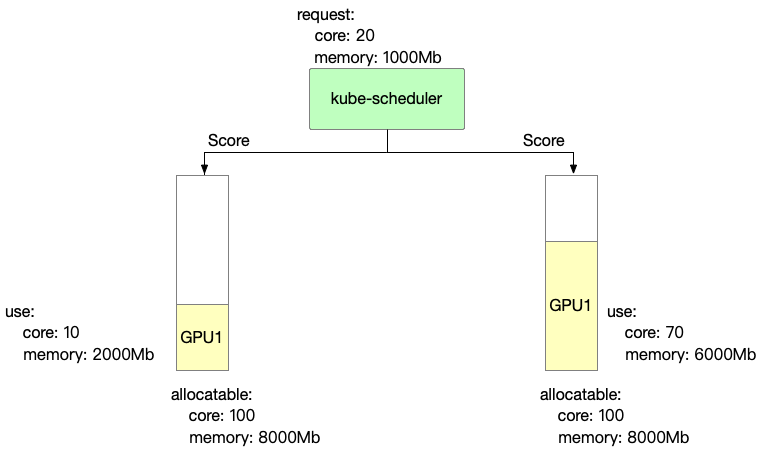
Binpack prefers the card with the higher device-utilization score. The following default-weight example assumes each card has ten virtual-device slots and no slot is currently in use:
score: ((request.slot + used.slot) / allocatable.slot +
        (request.core + used.core) / allocatable.core +
        (request.mem + used.mem) / allocatable.mem) * 10
- Binpack scoring information for GPU 1 is as follows
GPU1 Score: ((1+0)/10 + (20+10)/100 + (1000+2000)/8000) * 10 = 7.75
- Binpack scoring information for GPU 2 is as follows
GPU2 Score: ((1+0)/10 + (20+70)/100 + (1000+6000)/8000) * 10 = 18.75
In Binpack policy, GPU2 is selected.
Spread
Spread prefers the card with the lower device-utilization score. Using the same default-weight example:
score: ((request.slot + used.slot) / allocatable.slot +
        (request.core + used.core) / allocatable.core +
        (request.mem + used.mem) / allocatable.mem) * 10
- Spread scoring information for GPU 1 is as follows
GPU1 Score: ((1+0)/10 + (20+10)/100 + (1000+2000)/8000) * 10 = 7.75
- Spread scoring information for GPU 2 is as follows
GPU2 Score: ((1+0)/10 + (20+70)/100 + (1000+6000)/8000) * 10 = 18.75
In Spread policy, GPU1 is selected.
Mutex
Mutex gives a pod exclusive use of a GPU card. Only cards with no existing workloads (used == 0) are eligible; any card already in use is skipped with the ExclusiveDeviceAllocateConflict reason. If every card on a node is in use, the pod cannot be scheduled to that node.
Set it per pod via the annotation:
metadata:
  annotations:
    hami.io/gpu-scheduler-policy: "mutex"
Using the same example, GPU1 and GPU2 both already have workloads, so neither is eligible and the pod stays pending until a fully idle card is available. A card allocated to a mutex pod can still be selected for other pods afterwards; to keep the card exclusive for the lifetime of the workload, request all of its resources or use it together with use-gpuuuid constraints.
